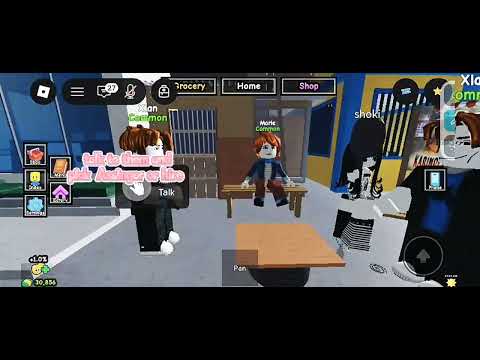
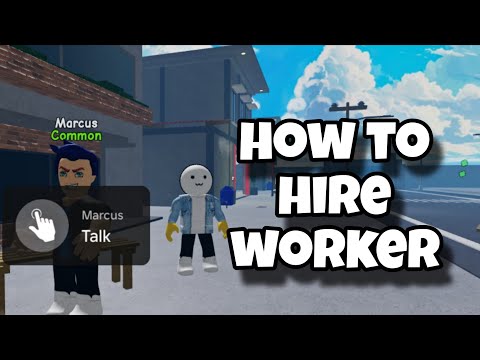
Workers spawn near Grocery and you hire them from a Talk panel; expect the terms to differ from worker to worker. A dated recording checked September 15, 2026 shows the game closing the store, announcing “Workers have spawned near the Grocery!”, and then offering several named NPCs at once — for example ₱100 for 1 day and ₱200 for 2 days — each with a rarity on the nameplate and a role you pick before hiring. An earlier recording checked August 25, 2026 showed a single offer of ₱300 for 3 days, which is why the price on your own panel is the only number worth trusting. The panel warns that Manual Assign may be disabled once hired.
Checked September 28, 2026 (page review; gameplay observation checked August 25, 2026)
In recorded gameplay footage checked August 25, 2026, interacting with the worker opens a Hire menu offering: “Hire me for ₱300 for 3 days.” The interface includes an active countdown timer, a Hire button, and a warning that Manual Assign may be disabled. This is a dated player-facing observation, not an official permanent contract.
Keep in mind: While this ₱300 for 3 days deal was shown in footage checked August 25, 2026, developers can adjust prices, timers, or spawn mechanics in future updates. Always check what your own in-game panel displays before spending. If you want to compare your measured cash pace, use the Worker Worth-It Test; it is player-input arithmetic, not official game math.
Hiring checklist
Key worker hiring conditions
Verify these conditions in your active server before spending in-game cash.
Condition
Observed gameplay state
Status note
Spawn location
Outside in front of Grocery
Check the exterior in front of Grocery in your active server.
Spawn timing
After the store closes for the night
A dated recording shows the Store Closed banner followed by an in-game notice reading Workers have spawned near the Grocery! An earlier creator reported seeing one in the morning instead, so follow whichever banner your own server shows.
Observed price & term
₱300 for 3 days
Shown in gameplay checked August 25, 2026; always verify active numbers on your client HUD.
Hiring window
Active countdown timer on Hire panel
Interaction prompt closes once the timer hits zero; cash must be confirmed before expiration.
Workflow change
Manual Assign may be disabled
Warning indicates Manual Assign may become unavailable once hired; how the worker handles customer seating in practice still requires live in-game verification.
Contracts & rarity
Each worker arrives with its own price, term, role and rarity
A dated recording checked September 15, 2026 opens the Talk panel on two workers in the same visit, and they do not offer the same deal, so plan to shop around before confirming one.
On the panel
Seen in that recording
Nameplate rarity
Workers stand together with a name and a rarity tag, for example Linda Rare, Marie Common, and Xian Common.
Talk prompt
Walking up shows a Talk interaction on that worker, which opens its contract panel.
Per-worker contract
Hire me for ₱100 for 1 day appeared on Xian and Hire me for ₱200 for 2 days on Marie in the same visit.
Role switch
A Role control toggles between stations such as Assigner and Dishwasher before you confirm.
Buttons
Hire confirms the contract, and Roll (₱300) sits beside it as a paid re-roll.
Confirmation
The game answers Hired Xian as your Dishwasher for ₱100! and the fee leaves your balance (₱30,856 to ₱30,756 in the recording).
After hiring
Use the Home button to get back to the restaurant, where the new worker is already standing at its station in the kitchen.
What that recording does not settle
Whether Roll (₱300) re-rolls a worker's rarity, its contract, or its role is not shown, and the panel countdown (a little over nine minutes in that visit) has no documented meaning. Rarity tags beyond Common and Rare stay unverified, and no stat difference between them appears on screen.
Watch the flow
Store closes, workers appear, panel opens
Under a minute, from the closing banner to a hired dishwasher standing in the kitchen.
Dated recording — September 8, 2026
Closing banner, spawn notice, two contracts
Watch for: the Store Closed banner, the Workers have spawned near the Grocery! notice, the rarity names on the workers, the role switch on the panel, and the hire confirmation that follows.
Spawn window
Look outside Grocery in your server
In gameplay footage by creator Journey towards success (00:13–00:25 ↗), the worker NPC was shown outside in front of Grocery during a limited hiring window. The creator observed the worker appearing in the morning after opening.
Because spawn schedules can shift across servers and updates, check the Grocery area periodically while playing rather than assuming a rigid clock. If the NPC is not there, continue serving customers and check again when the current server shows the offer.
The traveling merchant arrives on its own spawn roll
Your restaurant has a second timed visitor besides the worker NPC. A Karinderya patch log posted September 15, 2026 states that the traveling merchant's spawn rate was increased to 40%. Read that as a chance per roll rather than a schedule: the log gives no arrival hour, no stay length and no stock list.
Check the same place you already check for workers — walk the area outside Grocery while you play — and treat the merchant's own panel as the authority on what it carries and what it charges in your server.
Still open: the merchant's stock, prices, arrival hour, stay length and whether its offers differ between servers are not established here, and this site holds no recording of a merchant visit to confirm them. The Plant Merchant behind Plants & Pots is a separate seller that only handles flower pots and seeds.
Hire window
Step-by-step worker hiring
Confirm the latest terms and timer on your active server screen.
01
Have cash ready before searching
Make sure you have sufficient in-game cash on hand (footage showed an offer of ₱300 for 3 days) so you can confirm before the countdown timer expires.
02
Check outside Grocery in your server
Head outside your restaurant and look in front of Grocery to see if the worker NPC has spawned in your active server instance.
03
Interact before the countdown ends
Walk up to the worker NPC outside Grocery to open the prompt while the limited-time countdown timer is still active on the panel.
A countdown timer is visible in the Hire interface at 00:37 ↗ and 00:43 ↗.
04
Review the ₱300 for 3 days contract and warning
Confirm what your panel displays (recorded footage showed ₱300 for 3 days) and note the warning that Manual Assign may be disabled once hired.
Pay attention to the warning! The panel notes Manual Assign may be disabled once hired, though exact in-game seating behavior still requires live verification.
05
Confirm and hire before time runs out
If you have enough in-game cash and accept the terms, press Hire before the countdown timer expires to activate the worker.
Notice
The panel warns that Manual Assign may be disabled
The Hire panel explicitly warns that Manual Assign may be disabled once hired. In manual play, players walk up to waiting diners and use Assign Customer to Table. If manual assigning is disabled, you may lose direct control over specific table assignments while the worker is active, though exact worker pathing and seating behavior remain unconfirmed in current gameplay. Keep this potential workflow change in mind before confirming your contract.
After hiring
What the worker contract does next
The observed contract was 3 days. Everything past the Hire button is still unverified, so treat each row below as a check you run in your own server rather than a documented rule.
Question
What is known
What to check before you spend or wait
Contract ends
The dated recording showed a 3-day contract. What happens when it runs out is not documented.
Watch the worker and the Assign Customer to Table prompt as the term ends, and note whether seating control returns or the panel offers another contract.
Manual Assign
The Hire panel warned that Manual Assign may be disabled once hired. No footage shows the state after the contract ends.
Test assigning one diner by hand right after hiring, then again after the term, and record which prompt your client shows.
More than one worker
No recording shows a second worker, a second contract slot, or a stated hiring limit.
Recheck the Grocery exterior and the restaurant panel after you expand; a second offer appearing would be the only evidence of a higher limit.
Removing or replacing
Neither dated recording shows a fire, dismiss, cancel or replace control, and the official description does not mention one.
Community videos do name a removal route, so check your own worker panel before assuming you are locked in — see firing or removing a worker.
Worker missing mid-contract
Only the pre-hire offer has been recorded, so a missing worker during an active term is unverified.
Rejoin once to reach a newer server build, then compare the current panel and the latest update watch before treating it as a permanent change.
Un-hiring
How to fire or remove a worker
Community videos name this task, but no removal screen has been recorded for this page yet, so this section gives you the check to run instead of an invented click path.
What is confirmed and what is not
Confirmed: the task exists — several community videos published for this game are titled around removing, firing or replacing an employee, so players clearly can get rid of a worker somehow. Not confirmed here: the exact button, the panel it sits on, whether the hire fee is refunded, and whether a removed worker can be re-hired.
In the two dated recordings this page documents, only the pre-hire Talk panel is opened, so a removal control was never on screen. The official Roblox description does not mention removing or dismissing a worker at all. Treat the removal route as community-reported and unverified until your own client shows it.
01
Walk up to the worker you want gone
Open its Talk prompt the same way you did when hiring. If the panel still shows a contract, look below Hire and Roll for any secondary control such as Remove, Fire, Dismiss or Unassign.
02
Check the restaurant panel, not just the worker
If the worker stands at a station and will not open a menu, look for a staff or management list at your restaurant instead. Read every label before pressing anything — a removal control is what the community videos show, but its exact wording is not reproduced here.
03
Record what your panel shows before you confirm
Note whether a fee, refund or penalty line appears, whether the remaining contract days are mentioned, and whether the role slot frees up. Those three details decide whether the removal is clean or wastes the rest of the contract, and none of them are confirmed by any source checked here.
If no removal control exists in your server
That is possible — removal may have been added, moved, or locked behind a later build. Rejoin once to reach the newest server build and check again, then compare against the update timeline. If the control is still missing, treat the contract as running to its observed term rather than assuming you lost your cash.
Troubleshooting
Missed the worker or having trouble?
No worker outside Grocery
Footage shows a limited-time offer rather than a permanent worker outside. Keep serving customers and check the Grocery exterior periodically when the current server shows the offer.
The countdown timer expired
Gameplay footage shows a limited-time offer with an active countdown. If the timer expires, continue running your restaurant and check again when the current server shows the offer.
The Hire button will not complete
Make sure you have at least the amount shown on your current panel in your in-game cash balance and that the countdown timer is still running. Check any on-screen prompt if it still fails.
Your panel shows different terms
Always trust your live in-game screen over past footage. Future patches may adjust hiring costs, contract durations, or spawn locations.
More hands
Need more people in your restaurant: friends or paid workers?
These are two separate ways to add help. A hired worker is a contract you buy at the Grocery stall: one role, a fixed term, and Cash paid up front. A co-op player is another person in your own server, who is not on a paid contract.
The official Roblox listing describes Karinderya as a co-op restaurant simulator and reports a live six-player server maximum, so up to five other players can run the same restaurant with you. If diners queue at the door while your stoves sit idle, a second player on seating covers that bottleneck without taking Cash out of the restaurant; buy the contract when nobody else can join your shift.
The co-op guide covers getting into the same server as a friend and splitting kitchen, seating and delivery work between you.
Confirmed in gameplay
What the footage shows
Worker NPC standing outside in front of Grocery.
A Hire panel with an active countdown timer.
Observed contract terms of ₱300 for 3 days.
The panel warned Manual Assign may be disabled.
A one-tap Hire confirmation button.
Good to know
What to keep in mind
A dated recording shows the spawn announced after the store closes for the night, while an earlier creator reported a morning sighting, so rely on the in-game notice in your own server rather than a fixed clock.
Worker movement speed, pathing, and seating priority order.
Rarity tags do show on the nameplates (Common and Rare were visible in a dated recording), but any stat difference between them, and rarer labels such as “mythical workers”, remain unverified.
Whether restaurant expansions or upgrades affect hiring prices.
How quickly the NPC returns after a missed countdown.
Journey towards success · published August 23, 2026 · 0:56 runtime · about 41 views observed August 25, 2026. The creator reported that the worker appears outside in front of Grocery in the morning after opening, but developer notes have not confirmed a fixed universal schedule.
Key timestamps: NPC location outside Grocery and morning spawn note at 00:13–00:25 ↗. Hire panel with countdown timer, ₱300 for 3 days offer, Hire button, and Manual Assign warning at 00:37 ↗ and 00:43 ↗.
Quick answers
Frequently asked questions
Where was the worker found in Karinderya?
In gameplay footage from August 23, 2026, the worker NPC appears outside in front of Grocery during a timed offer. Check that area in your current server when playing. A later recording from September 8, 2026 describes a different window and location instead, and its place name is not readable in the automatic captions, so treat the whereabouts as unsettled rather than confirmed.
When does the worker appear in Karinderya?
In gameplay footage, creator Journey towards success reported observing the worker outside Grocery in the morning after opening. However, whether all servers share a fixed schedule is unconfirmed, so check the Grocery exterior periodically during your session.
How much did the observed worker cost?
It depends on the worker. One dated recording showed a single offer of ₱300 for 3 days, while a later recording opened two panels in the same visit and read “Hire me for ₱100 for 1 day” on one worker and “Hire me for ₱200 for 2 days” on another, with a separate Roll (₱300) button beside Hire. Always read the panel in front of you before confirming.
Can you choose what job a hired worker does?
Yes, a dated recording shows a Role control on the contract panel that toggles between stations such as Assigner and Dishwasher before you confirm. After hiring, the worker appears at that station in the kitchen, and the confirmation message names the role, for example “Hired Xian as your Dishwasher for ₱100!”.
What is the Roll button on the worker panel?
A dated recording shows a Roll (₱300) button sitting beside Hire on the contract panel, but the recording never presses it, so what it re-rolls is unverified. It is worth treating as a paid gamble on a different worker or contract until your own panel proves otherwise.
Why did the worker disappear?
Footage shows the Hire panel uses a countdown timer for a limited-time offer. If the timer expires, keep running your restaurant and check again when the current server shows the offer.
Can I still assign customers manually after hiring?
The panel warns that Manual Assign may be disabled once hired, suggesting workflow changes to customer seating, though exact in-game behavior remains unconfirmed.
How do I fire or remove a worker in Karinderya?
The task exists — several community videos published for this game are titled around removing, firing or replacing an employee — but no removal screen has been recorded on this page, and the official description never mentions dismissing a worker. Open the worker's Talk prompt and look below Hire and Roll for a secondary Remove, Fire, Dismiss or Unassign control, or check for a staff list at your restaurant. Record whether a fee or refund line appears before you confirm. If no control is visible in your server, rejoin once to reach the newest build and check again, then treat the contract as running to its observed term.
What should I prepare before trying to hire a worker?
Ensure you have sufficient in-game cash ready (recorded footage showed ₱300 for 3 days) and check outside Grocery so you can interact and confirm before the panel's countdown timer expires.
Can you fire or remove a worker in Karinderya?
No fire, dismiss, cancel or replace control has been shown in dated gameplay, and the official Roblox description does not mention one, so the answer is unverified rather than no. Check the current panel for a management entry point before assuming you are locked in; if none is visible, treat the contract as running to its observed 3-day term.
Can you hire more than one worker in Karinderya?
Not verified. No recording shows a second worker, a second contract slot, or a stated hiring limit, so the only evidence of a higher limit would be a second offer appearing at the Grocery exterior or in the restaurant panel after an expansion.